


Table of Contents
Building a truly functional iOS app requires more than coding skills; it also demands the right iOS app development service, tools, expertise, and a clear action plan to bring your vision to life. Whether you are creating a high-performing application or refining an existing project, starting with the right development tools lays the foundation for a successful app.
At Differenz System, we don’t just use these tools; we combine them with our years of experience building exceptional on-demand applications for any business need.
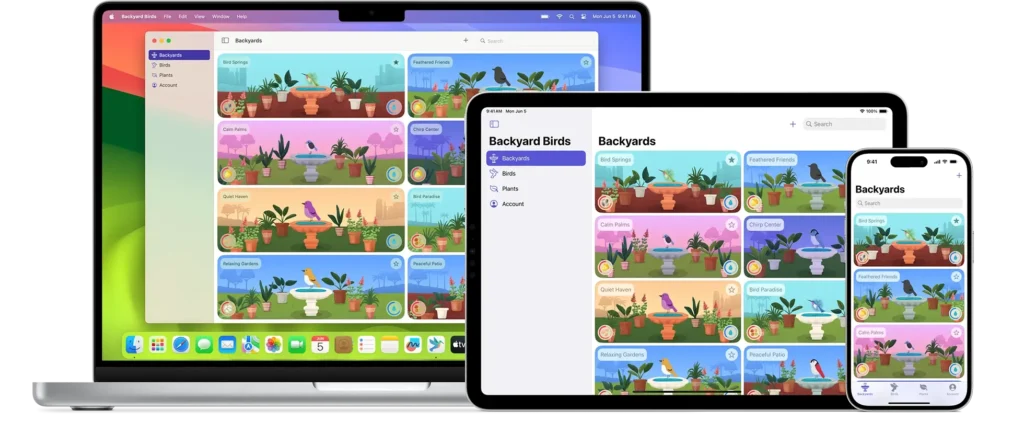
Here are the top iOS app development tools to simplify design, accelerate development, and ensure flawless execution. We offer end-to-end services to turn your concept into a ready-to-market app. If you’re ready to transform your app concept, contact our expert mobile app development team at Differenz System. Now, let’s explore how the tools below can enhance your next iOS application development project.
IDE & Editor
Xcode: A must have IDE
Xcode is Apple’s official integrated development environment (IDE) for iOS development and is a powerful tool for coding, debugging, testing, and deploying applications.
What are the benefits of using Xcode?
- A powerful code editor with syntax highlighting, code completion, auto-formatting, and error detection enhances productivity.
- Designing user interfaces is easier than ever – Xcode’s drag-and-drop tools let you build visually stunning layouts without needing to dive deep into code.
- It allows developers to test apps on various iOS devices, versions, and models.
- It manages the build process, including compiling, linking, and signing.
- Integrated performance tools like Instruments help monitor and optimize app performance, memory usage, and energy consumption.
- Seamless integration with Git and built-in support for version control.
- This Apple iOS development tool is free and available exclusively for macOS, making it essential for developers.
In the healthcare sector, where user privacy is very important, Xcode’s built-in debugging tools for iOS app development allow developers to identify vulnerabilities early in the development process.
CodeRunner
CodeRunner is a lightweight editor that supports multiple programming languages. Although it is not as comprehensive as Xcode, it is ideal for quick scripting, testing ideas, or debugging specific pieces of code.
It is a versatile tool that simplifies running code snippets directly in your text editor.
Why Developers prefer CodeRunner?
- You can generate code snippets from programming languages directly in your editor using simple shortcuts.
- It also supports various programming languages, including Python, JavaScript, C++, Java, and more.
- The results of your code are shown directly in the editor, so you can easily see the output.
- It is a fantastic tool for learning and practicing new programming languages.
- It is perfect for running small scripts or testing individual code blocks without create a separate file or project.
While CodeRunner is a great option for quick scripting, it lacks Xcode’s comprehensive tools for UI design and deployment.
Programming Languages
Swift
Swift is a modern programming language developed by Apple, optimized for safety, speed, and simplicity. It is the preferred programming tool for most new iOS projects because of its features.
Why Choose Swift?
- Swift’s syntax is clean, readable, and easy to understand, even for beginners.
- Strong typing, optional handling, and safety features help prevent common programming errors.
- It supports functional programming paradigms such as higher-order functions and closures.
- A large, active community provides support, making it easier to find resources and solutions.
- Swift is built on the LLVM (Low Level Virtual Machine) compiler infrastructure, ensuring faster code execution compared to other languages like Python or JavaScript.
“Swift can easily work with older code written in Objective-C.”
Objective-C
Objective-C is an older language for iOS development, but it is still used in many existing apps with Apple’s APIs and frameworks.
It remains relevant for maintaining legacy iOS applications.
Use Case:
- If you are working on older apps or need to connect with C or C++ code, Objective-C is very useful.
- This iOS programming language supports object-oriented concepts such as classes, objects, and inheritance.
- Its variables can hold objects of different types at runtime.
- Objects communicate by sending messages to each other.
- It uses manual memory management through reference counting unless used with Automatic Reference Counting (ARC), which was introduced later.
“Swift is designed to be safe and easy to use, but Objective-C gives programmers more flexibility because of its dynamic runtime, allowing message passing even at runtime.”
Frameworks
CocoaPods: The Dependency Manager
CocoaPods is an essential tool for iOS developers, acting as a dependency manager for Swift and Objective-C Cocoa projects. It automates the integration of external libraries and frameworks, ensuring that all dependencies are managed and updated efficiently.
Benefits of Using CocoaPods:
- Streamlined Integration: Easily integrates thousands of libraries into your project with a simple pod install command.
- Version Control: Manages library versions to help prevent conflicts and compatibility issues.
- Automation: Automatically generates and updates the Xcode project or workspace files needed to include libraries.
- Community Support: Provides access to a large repository of shared libraries, significantly accelerating development.
- CocoaPods is especially useful for large projects with multiple dependencies, simplifying the maintenance and updating of libraries and allowing developers to focus more on core application logic.
Cocoa Touch
Cocoa Touch is Apple’s official framework for building applications for iOS and other Apple devices. It provides a foundation for applications, offering features such as multitouch gestures, animations, and networking.
- UI elements like buttons, sliders, table views, and more make it easy to create responsive and interactive user interfaces.
- It includes key technologies such as Core Data and Core Animation.
- It is a framework for managing object graphs and persistence.
- It can recognize gestures properly, such as detecting swipes, pinches, and taps for interactive user experiences.
SwiftUI
SwiftUI is a declarative framework introduced by Apple in 2019 that allows developers to create user interfaces for all Apple platforms. Built on top of Swift, SwiftUI makes it easy to create responsive and dynamic UIs.
It is used specifically for designing the app’s user interface.
Benefits of SwiftUI:
- It uses declarative syntax, so you only need to specify the UI you want, and it handles all rendering for you.
- With data binding, any changes in your data are instantly reflected in the UI, ensuring seamless synchronization.
- This design is also cross-platform, allowing you to create reusable UI components that work across iOS, macOS, watchOS, and tvOS.
- SwiftUI’s Preview Canvas lets you see UI updates in real time as you make changes, immediately reflecting modifications and simplifying the UI development process.
- It integrates deeply with system features such as Dark Mode, Dynamic Type, and Accessibility, ensuring your app looks natural and user-friendly.
“For legacy apps or significant customization, choose Cocoa Touch, while SwiftUI is best suited for projects that prioritize quick development and modern design”.
Reactive Programming Library
RxSwift

RxSwift is a useful library for iOS app development that introduces reactive programming to Swift.
- It is a unique way of writing code that makes it easy to handle events and changes in your applications.
- It is a system for describing how different parts of your application should react to tasks, such as user actions or data updates.
Key Features:
- It can produce more concise and readable code, especially when handling asynchronous operations and complex data flows.
- It simplifies managing data events and updates, such as user interactions, network requests, and data changes.
- Code written with RxSwift is easier to test due to its declarative nature and focus on data streams.
- Use case: Imagine building a chat app where messages update in real time. RxSwift can listen for new messages from a server and update the UI seamlessly.
Alamofire

Alamofire is a popular third-party, Swift-based networking library for making HTTP requests in iOS apps.
It simplifies tasks like API requests, JSON parsing, and data uploads.
Key Features:
- This tool provides an easy way to make various HTTP requests, such as GET (to fetch data), POST (to send data), PUT (to update data), and DELETE (to remove data).
- It goes beyond the basics by supporting advanced features, including automatic handling of JSON data (common in modern apps) and simple file uploads. It is packed with features that save you time and effort.
- You can customize it to fit your specific needs. Whether you’re building a simple app or a complex one, it gives you the flexibility to configure how networking tasks are managed.
- Use case: In an e-commerce application, Alamofire can fetch product details, submit orders, and handle user authentication with secure HTTPS connections.
Debugging Tool
Debugging is essential for delivering a reliable, bug-free app. These tools help simplify the development process:
Charles Proxy

Charles Proxy is a powerful HTTP proxy tool that allows developers to inspect network traffic between their devices and the internet. It acts as an intermediary to receive, capture, and display all HTTP and HTTPS requests and responses in real time.
Key Benefits:
- You can decrypt and view encrypted HTTPS data or traffic, enabling you to analyze sensitive information such as headers, API payloads, passwords, and cookies.
- You can simulate various network conditions, such as slow connections or limited bandwidth, to test how your application performs in different situations.
- Pause network traffic at specific points to inspect and modify requests and responses before they are sent or received.
- It filters captured traffic based on criteria such as URL, hostname, request method, and response status code, helping you focus on specific interactions of interest.
- It easily repeats requests multiple times with different parameters to test various scenarios.
RayGun

Raygun is a powerful cloud-based platform that helps developers monitor and improve the performance and stability of their iOS applications, ensuring a stable and reliable experience for users.
- It identifies and fixes crashes, issues, and errors that can negatively impact user satisfaction, resulting in a more stable and reliable app for users.
- It helps diagnose and quickly resolve issues, reducing the time needed to fix bugs.
- This iOS development tool can be integrated with many other tools and services, including Slack and Jira, to optimize and speed up your workflow.
- Raygun provides insights into how users are interacting with your application.
- It offers real-time tracking of app performance, including page load time, network requests, and more.
Backend-as-a-Service (BaaS) Platform
Firebase

Firebase, developed by Google, is a comprehensive backend-as-a-service (BaaS) designed for iOS development. It integrates services such as user authentication, real-time database, cloud storage, and push notifications into apps easily, without requiring developers to manage server complexities.
Essential features:
- It is a cloud-based database that coordinates real-time data synchronization across devices.
- It provides easy-to-use authentication services, including email/password and social login.
- Firebase offers cloud storage and retrieves user-generated content such as images and videos.
- Integrate machine learning capabilities into your app, including image recognition and natural language processing.
- Run custom server-side code in response to events such as database updates or user authentication.
Testing Platform
TestFlight

Testers can easily install beta builds directly on their devices.
TestFlight seamlessly integrates with Xcode, making it incredibly easy to distribute beta builds to testers.
The tool provides early insights into usability or user experience, helps you discover potential issues, and allows you to gather feedback before the app’s launch.
- By eliminating or modifying bugs based on tester feedback, the quality and stability of applications can be greatly improved.
- Testers can submit feedback directly through the application.
- Supports external testers through an invite system.
- Allows testing of apps with various configurations, such as localization testing.
Designing tools
Figma: Design and Prototyping for iOS Apps

Figma is a powerful design tool widely used in iOS app development for UI/UX design. This browser-based interface design tool offers real-time collaboration, making it a favorite among designers and developers working in teams.
Why Figma Stands Out in iOS App Design:
- Real-Time Collaboration: Enables multiple team members to work on the design at the same time, viewing changes instantly.
- Vector Networks: Offers a unique approach to design creation, different from traditional vector drawing tools, making it easier to manipulate complex interfaces.
- Design Systems: Supports the creation and maintenance of design systems to ensure consistency across all designs.
- Prototyping: Provides prototyping features within the same tool, allowing designers to create interactive prototypes without additional software.
- Integration: Integrates easily with other tools and platforms, including Slack for communication and Zeplin for developer handoff.
Figma streamlines the interface design process for iOS apps, from initial wireframes to final prototypes, ensuring a smooth transition from design to development.
Sketch
Sketch is a widely used tool for application development; UI and UX designers use it to create the visual appearance of applications. It functions as a sophisticated digital drawing board designed specifically for mobile and web application design.
It is highly recommended for its simplicity, speed, and ability to create visually stunning app designs.
What Makes a Sketch Tool Useful?
- Sketch is simple and intuitive, allowing designers to quickly create beautiful application designs.
- It lets designers make precise adjustments to shapes, colors, and layouts.
- Sketch supports many plugins, making tasks like animations and sharing designs even easier.
- Designers can upload their work to the cloud, so teams can view, comment, and collaborate in real time.
- It’s built specifically for app design, providing all the necessary tools for iOS application development.
- It makes it easy to create designs that work well on all screen sizes.
Flawless: Making Designs Match Perfectly
Flawless is a powerful mobile app development tool used to ensure that the final implementation of an iOS application matches the original design with complete precision. It bridges the gap between designers and developers by providing features that streamline the comparison process.
What Flawless iOS mobile app development tool Do?
- It compares the app’s design and the actual app side by side, spotting any differences such as mismatched colors, spacing, or fonts.
- Developers can identify and fix problems immediately while working on the app.
- Flawless is useful for detecting visual inconsistencies in animations or transitions.
- Designers and developers can use Flawless together to collaborate, share ideas, and quickly resolve any issues.
- It integrates easily with other tools that developers and designers want to use.
- It ensures the application looks professional.
- With the Flawless iOS development tool, you can be confident that the final app looks just as impressive as the original design.